How do I adjust the temperature in my Ford?
You can adjust your cabin temperature using the SYNC®* or Ford Digital Experience®** system or physical knobs, depending on what your vehicle is equipped with.
Changing Your Vehicle's Cabin Temperature
Select from the following drop-down options to learn how to modify the heat and air conditioning temperature settings in your vehicle.
Identifying Your SYNC Generation
Select a resource in the table below to help you identify your vehicle's SYNC generation.
| Resource | Instructions |
| SYNC and Navigation Updates page | Either:
Your SYNC generation will appear on the right side of the page under the SYNC Current Version heading. |
| SYNC Visual Reference Guide | View example images of SYNC generations that Ford has offered. |
Ford Digital Experience
You can adjust your vehicle's temperature by pressing the left and right arrows on the bottom left-hand corner of the screen or by swiping up to use a touch-sensitive meter.
| Left and right arrows | Touch-sensitive meter |
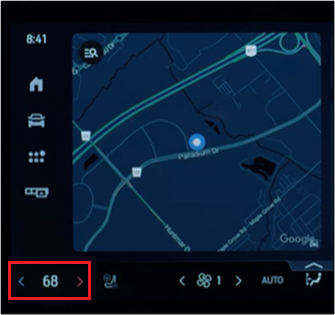 | 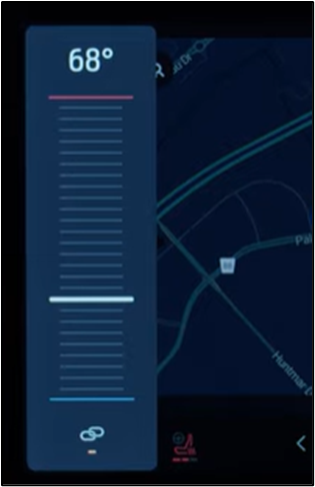 |
SYNC 4A
- Tap the Settings or Home icon on your vehicle's SYNC screen.
- Press the + or - button on the screen or use the volume control knob, depending on your software version, to adjust the temperature.
SYNC 4
To change the cabin temperature in your SYNC 4-equipped vehicle, twist the physical knob as shown in the image below.
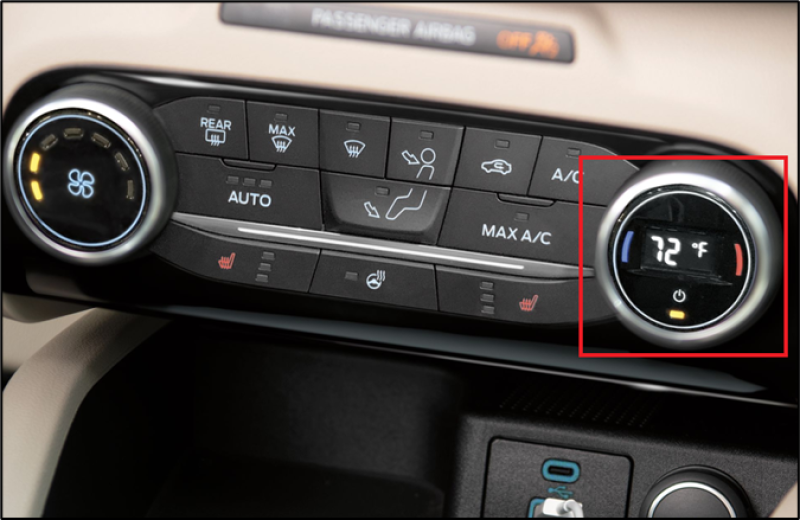
SYNC 3
This video explains how to use SYNC 3 to adjust your vehicle's heat and air conditioning for optimal driving comfort†.
Vehicles equipped with SYNC with MyFord Touch
This video explains how to use SYNC with MyFord® Touch to adjust your vehicle's heat and air conditioning for optimal driving comfort†.
Escape/Focus/C-Max Equipped with Automatic Climate Controls
This video explains how to adjust your Escape, Focus, or C-Max vehicle's heat and air conditioning for optimal driving comfort if equipped with automatic climate controls.
*Don’t drive while distracted. Use voice-operated systems when possible; don’t use handheld devices while driving. Some features may be locked out while the vehicle is in gear. Not all features are compatible with all phones.
**Some Ford Digital Experience features require a Connected Services plan. Don’t drive while distracted or while using handheld devices. Use voice-operated systems when possible. Some features may be locked out while the vehicle is in gear. Not all features are compatible with all phones.
†Actual screens may vary. See your Owner’s Manual for information specific to your vehicle.